
Sponsored by Bluehost. This article is part of a paid collaboration. I earn a commission from qualifying purchases made through my Bluehost affiliate links.
Hands-on case study · AI & fashion
I Built an AI Affiliate Website with Bluehost AI Builder (No Coding!)
By Fashion Dropshipping · · 10-minute read
Can you build a potentially profitable AI affiliate website without coding? I wanted to test the building part first. My project, Wear This!, turns fashion preferences into outfit suggestions and Amazon shopping searches. Bluehost AI Builder created the application; Google Gemini supplies the recommendations.
I got a working demonstration onto a public address, but it took revisions. This is my Bluehost AI Builder review and tutorial: what I built, where the integration failed, and what still needs testing before I can call it a business. I have no revenue results to report.
Watch the full build
Watch the full video: Building an AI Affiliate Website with Bluehost AI Builder.
What is Bluehost AI Builder?
Bluehost AI Builder creates websites and web applications from plain-language instructions. I could describe the behavior, upload branding, review a preview, and request changes by chatting. Hosting is included. That makes it an approachable AI website builder for beginners who have an idea but cannot implement the interface themselves. See Bluehost’s first-project walkthrough for the current process.
It is not an ecommerce store builder. Bluehost’s documentation says online selling and payment processing are not supported by Bluehost AI Builder at this time. That suited my affiliate experiment: visitors shop elsewhere. If your goal is to take clothing orders yourself, our online clothing store guide follows that different model.
My business idea: an AI fashion stylist
Wear This! asks what someone needs to dress for, then suggests three outfits. Each includes clothing descriptions, styling tips, estimated budgets, and Amazon search links carrying my Amazon Associates tracking ID. I wanted a useful starting point for someone facing the familiar question, “What should I wear?”
This is affiliate marketing: no inventory, shipping or checkout for me to manage. It differs from fashion dropshipping, where the retailer takes the order and has customer responsibilities. Generating an outfit is only the first step; earning a commission requires a qualifying purchase under Amazon’s rules.
Getting started: from idea to prompt
I signed in with Google and described the project. Before using my building credits, I asked ChatGPT to turn my longer instructions into a compact brief. The key was defining inputs, outputs and boundaries, rather than asking for “a beautiful fashion website.”
I specified fashion category, occasion, USD budget, style and optional preferences; three Gemini-generated outfits; and an Amazon search button for each suggested item. I also asked for affiliate disclosures and a privacy page. Here is a reusable summary of my brief, rather than a verbatim transcript:
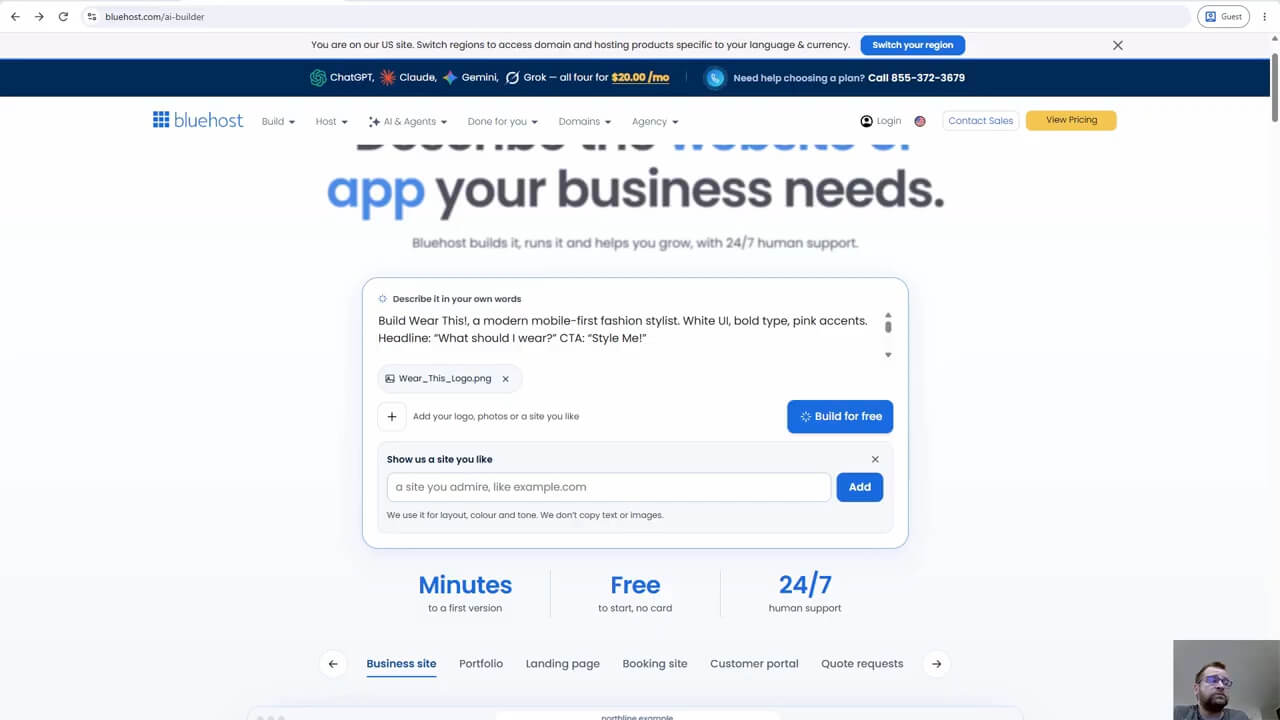
Build Wear This!, a mobile-first AI fashion stylist. Use my logo, bold typography and pink accents. Collect category, occasion, budget, style and preferences. Return three outfits with descriptions, styling tips and estimated budgets. Use Gemini through a server-side secret. Generate Amazon search links with my tracking ID; do not invent product listings or live prices. Include privacy and affiliate disclosures.
Branding, inspiration and the first preview
I uploaded my custom Wear This! logo and used Whering as a visual inspiration reference. My aim was a modern fashion feel, with white surfaces, strong type and hot-pink actions. A reference is a direction for layout and tone, not permission to copy another company’s text, images or identity.
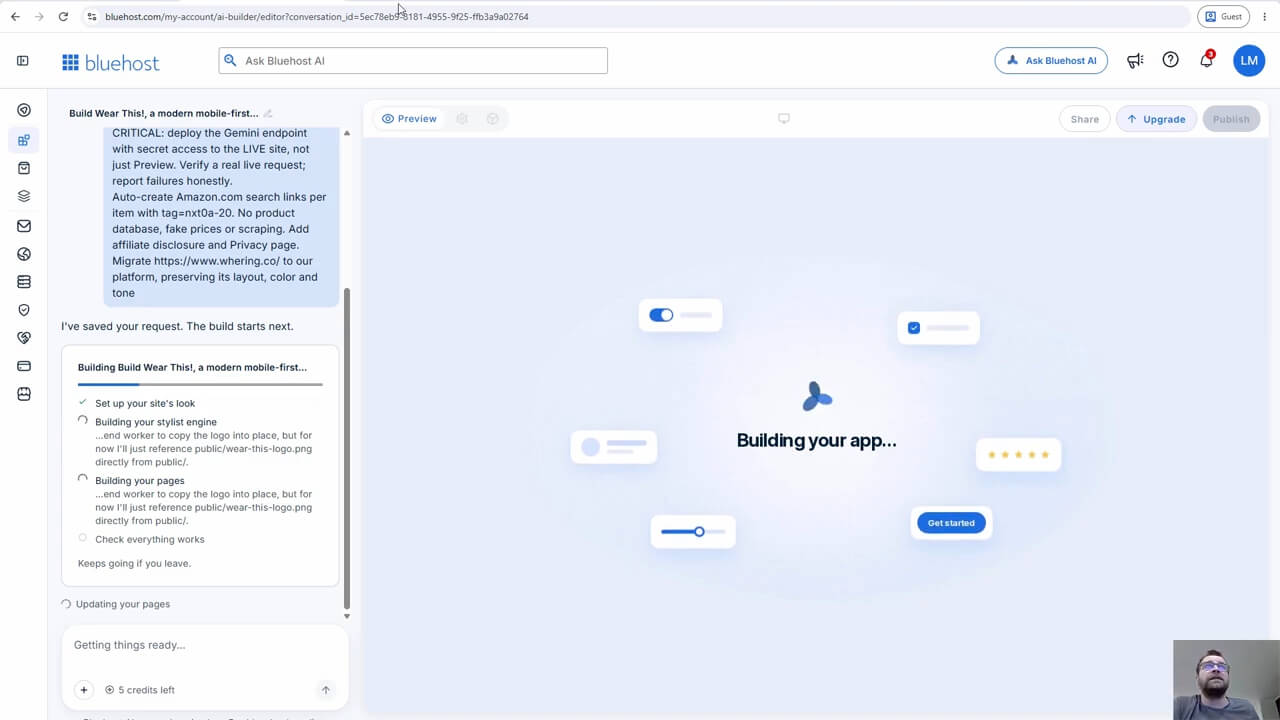
Bluehost AI Builder then generated the application while showing progress in the editor. I could inspect the developing result instead of assembling every component manually.
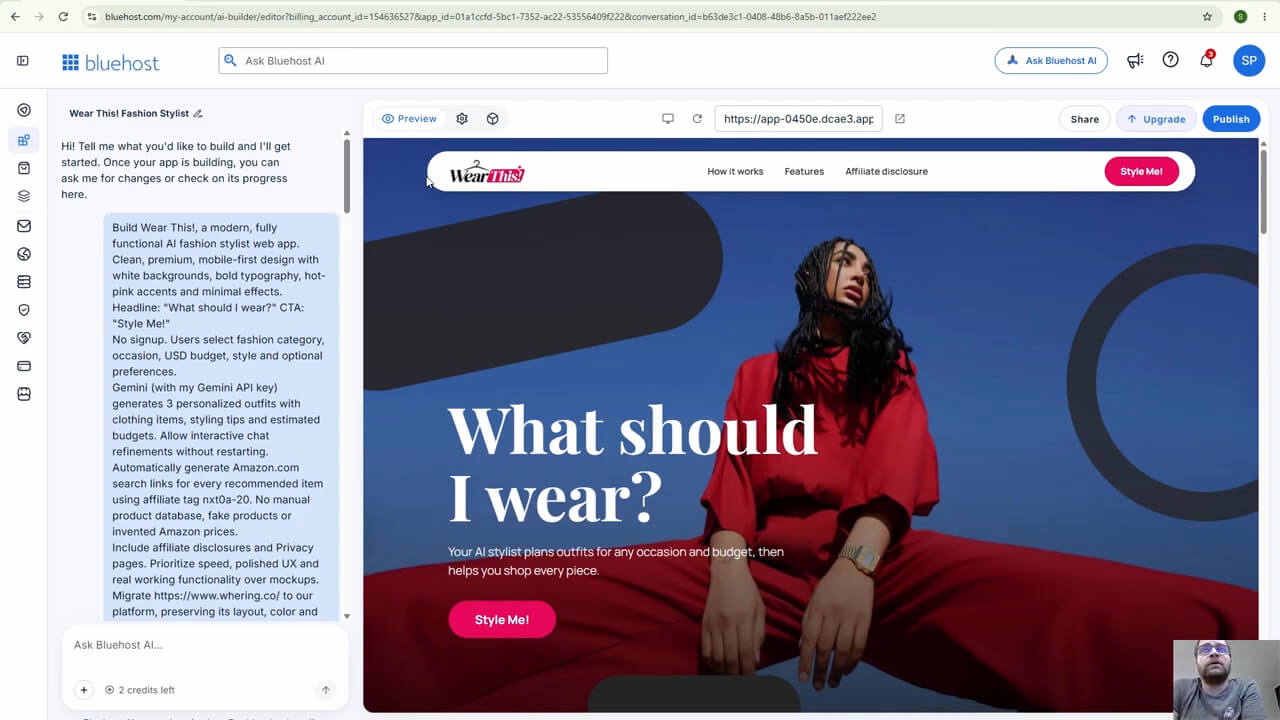
The preview gave me a recognizable fashion application: a branded navigation bar, a large “What should I wear?” headline and a “Style Me!” button. That was encouraging visually. It did not yet prove the AI worked for visitors outside the editor.
Connecting Gemini and publishing the application
I created a Google Gemini API key through Google AI Studio and used the available free tier for this experiment. Gemini is a separate service: its model availability, quotas and billing are independent of Bluehost AI Builder. Google documents request and token limits; “free” does not mean unlimited outfit generation.
I stored the key in Bluehost Secrets. For a similar project, open Settings, choose Secrets, save the key under a name such as GEMINI_API_KEY, and ask Bluehost AI Builder to reference that secret on the server. Do not paste the actual key into the chat, page content or browser JavaScript. Bluehost’s external-service connection guide explains this separation; Google’s API-key guide covers its side.
I published Wear This! on a free Bluehost subdomain. After changes, I needed to publish again and repeat the visitor journey. My checks for a similar launch would include a fresh browser session, a valid request, a visible failure message when generation fails, and working shopping links.
Testing Wear This!: a $100 interview outfit
For the recorded demonstration, I selected Men’s, Work / Office, a $100 budget and Minimalist style. In the additional instructions, I explained that I was going to a job interview and needed a modern but formal outfit.
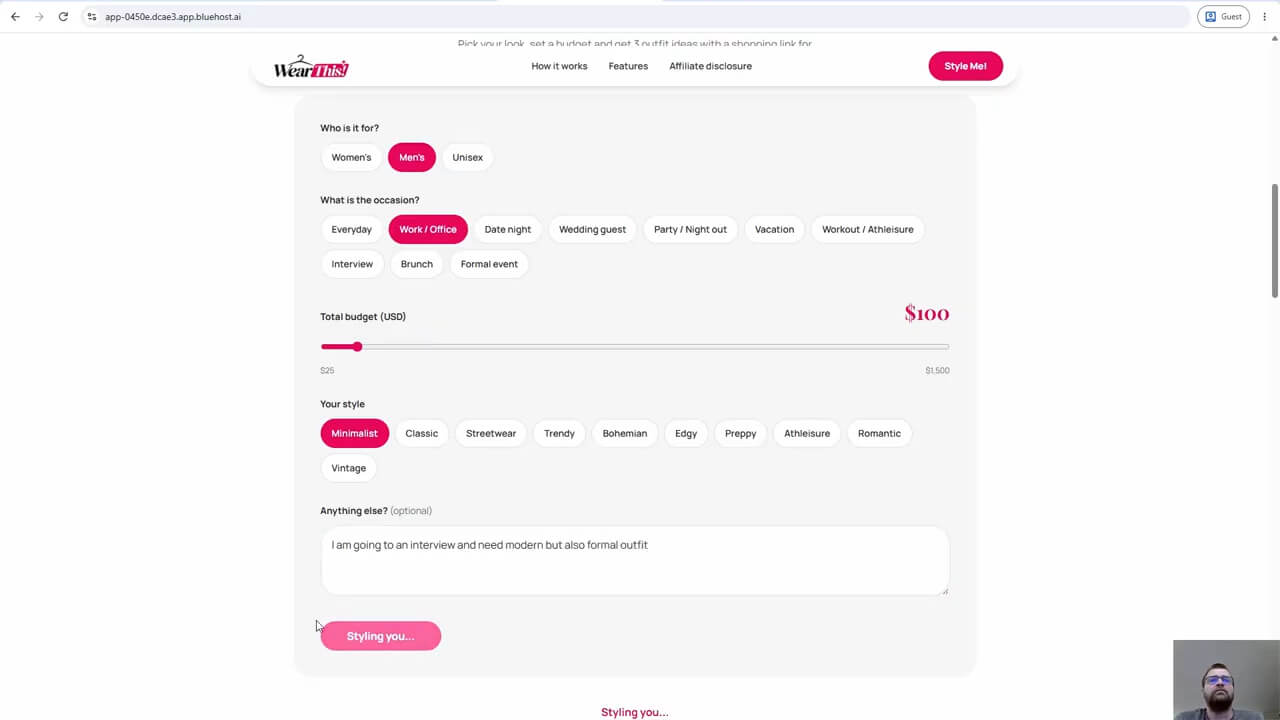
The application returned three outfit recommendations with clothing suggestions and styling explanations. The results included combinations such as a poplin dress shirt, tailored trousers, dress shoes and a belt, plus reminders about fit, tucked shirts and coordinating accessories.
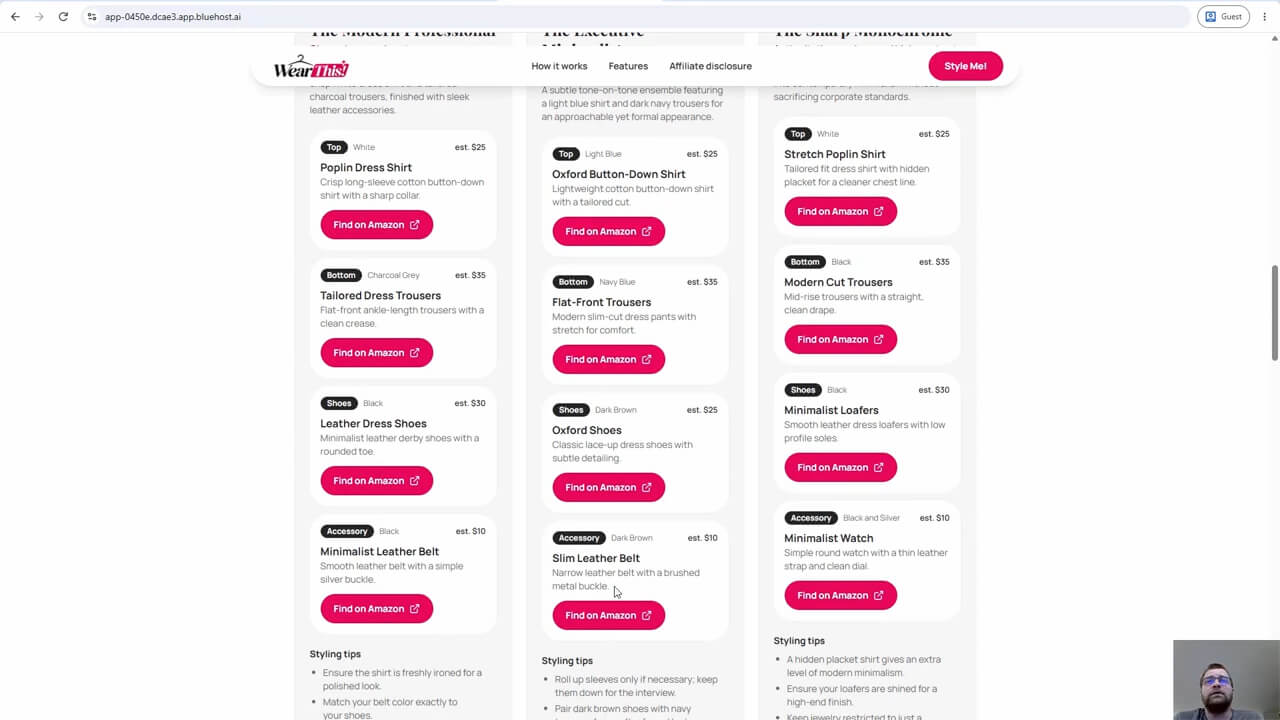
These are AI-generated suggestions, not a checked shopping basket. The displayed estimates do not establish current Amazon prices, available sizes, stock, delivery or the final total. A visitor still needs to inspect the actual search results and decide whether the pieces suit their budget and occasion.
Monetization without a manually maintained catalog
Each “Find on Amazon” button opens a search based on the suggested item, with my tracking ID added. That avoids maintaining individual product listings, but it also means the button does not identify a verified product at the estimated price. I would check the search relevance and tracking on any similar build.
As an Amazon Associate I earn from qualifying purchases. The demo contains affiliate-enabled Amazon search links. Participation and commissions remain subject to the Amazon Associates Operating Agreement; this demonstration is not a guarantee of program approval or earnings.
Bluehost AI Builder pricing and practical limits
The starting offer is $0 to start, no credit card, with paid plans from $20/mo. The Free plan publishes on a Bluehost subdomain; connecting a custom domain requires a paid plan. Current advertised monthly options include Lite at $20/mo and Standard at $40/mo. Review checkout terms, renewal pricing and any separate domain costs before paying.
Bluehost’s plans and credits documentation lists 5 credits daily, capped at 30 per 30-day period on Free, and monthly allowances of 100 for Lite, 200 for Standard and 400 for Pro. A build or change request consumes a credit; publishing and hosting do not. When building credits run out, new edits pause, while the published site stays online under the hosting terms. Gemini’s own limits still apply.
Explore Bluehost AI Builder — Start for Free
Affiliate link. I earn a commission from qualifying purchases. $0 to start, no credit card; paid plans from $20/mo. Check the current plan and billing terms.
What I liked, and what could be improved
The straightforward building process and visual customization helped me turn an idea into something visitors could try. Prompt-based changes, my own branding and Gemini integration made the result more useful than a static mockup. The affiliate model also fits a small fashion discovery tool.
The Preview-versus-production problem was the biggest drawback in my test. Fixes needed more requests, and the limited credit allowance makes clear instructions valuable. Generated design still needs human review, while estimated prices and search links leave shopping verification to the visitor. I would also test phone usability, accessibility, failure handling and ongoing API costs before promoting it widely.
Can an AI affiliate website make money?
Potentially, but building an application does not create demand. My plan is to test traffic and affiliate earning potential over the next 30 days. I want to record visits, useful styling sessions, outbound shopping clicks, qualifying commissions and actual costs. This is a planned experiment, not proof of income.
A simple measure is commissions received minus hosting, API, domain and promotion costs. My time matters too. Visitors may enjoy the recommendations without buying anything. I would use our fashion niche guide to define whom the tool helps, while keeping its clothing-store examples separate from this affiliate model.
My verdict: start with a small, testable idea
Bluehost AI Builder is worth exploring for an entrepreneur who wants to build an affiliate website without coding and is willing to test the result. Wear This! showed me that a functional AI fashion stylist is achievable through prompts. It also showed why publishing, testing and revising are part of the work.
I would begin with one useful journey, check every external integration, and spend more only when there is a reason. The outcome I can report today is a working demonstration—not a proven profitable website.
Build your own small experiment
Try Bluehost AI Builder — Start for Free
Affiliate link. I earn a commission from qualifying purchases. $0 to start, no credit card; paid plans from $20/mo.
Explore the Wear This! live demo
The demo includes Amazon affiliate search links. As an Amazon Associate I earn from qualifying purchases. Outfit budgets are estimates, not live Amazon prices.
Bluehost AI Builder FAQ
Can I build a website for free?
Yes. Bluehost AI Builder offers $0 to start, no credit card, with publishing on a Bluehost subdomain. A custom domain needs a paid plan.
Do I need coding experience?
I built this through prompts rather than writing code. You still need to explain the behavior, review the output and test it.
Can Bluehost AI Builder create functional web applications?
Yes. Wear This! demonstrates a form that returns Gemini-generated outfits. A working demonstration does not establish reliability at scale.
Can I connect my own AI API?
Yes, using an external service’s API and a server-side secret. I connected Gemini; its separate usage limits and terms apply.
Can I monetize with Amazon affiliate links?
That is my experiment, subject to Amazon Associates eligibility and rules. Search links and a published application do not guarantee commissions.
Does Bluehost AI Builder support ecommerce?
Not online selling or payment processing at this source check. Bluehost AI Builder is for websites and apps; this project sends shoppers to Amazon.
What happens when free credits run out?
New building pauses. Wait for a refresh, buy a top-up or upgrade. The published site stays online; separate Gemini quotas can still stop recommendations.
Product details checked 13 November 2026 against Bluehost’s FAQ, plans, publishing and connection guides linked above. Features and terms can change. The project narrative and five original screenshots document my own build; the 30-day business test remains planned.